A few weeks ago, I wrote about an app that looks at you through the Mac’s webcam, and as soon as it detects a slouching posture, it sends a notification. The app even logs all the instances and provides a daily posture score. It was an open-source app, but soon after it was shared on Reddit by the creator, a huge chunk of fellow Reddit lurkers started asking about how it processes and stores data. Those were existentially valid queries.
After all, you are giving an app access to the camera, which can monitor you and the world around you in real-time. Is there a backdoor that allows a bad actor to take a sneak peek? What else is the app logging in the background, and how much of the audio-visual stream is being relayed or stored on an external cloud server? Thankfully, the app works fully online, and all the processing happens locally on my Mac. But the sense of unease prevailed.
That pushed me to try creating my own software. But instead of using the camera to see and detect bad posture, I thought, why not use the motion sensors inside the AirPods? I had no idea how the system would even work in the background, so I turned to the wizard that everyone these days is visiting to find answers — an AI chatbot. For me, that wizard was Anthropic’s Claude.
And the wall came crashing down
The big problem? I have not written a single line of coherent code in my entire life. I barely even know the coding languages that are used to build software for mobile and desktop platforms. And to my utter surprise, I was able to create a fully functional app by talking to Claude AI, without ever seeing what the app looks like visually.

I asked the AI chatbot if such an app was feasible, and once I got an affirmative answer, I let Claude take the lead and build the whole app. I didn’t even have a look at the underlying code. It just asked me a few questions through the process about my preferences, and I replied with a few words. Within half an hour, I had the app running on my Mac.
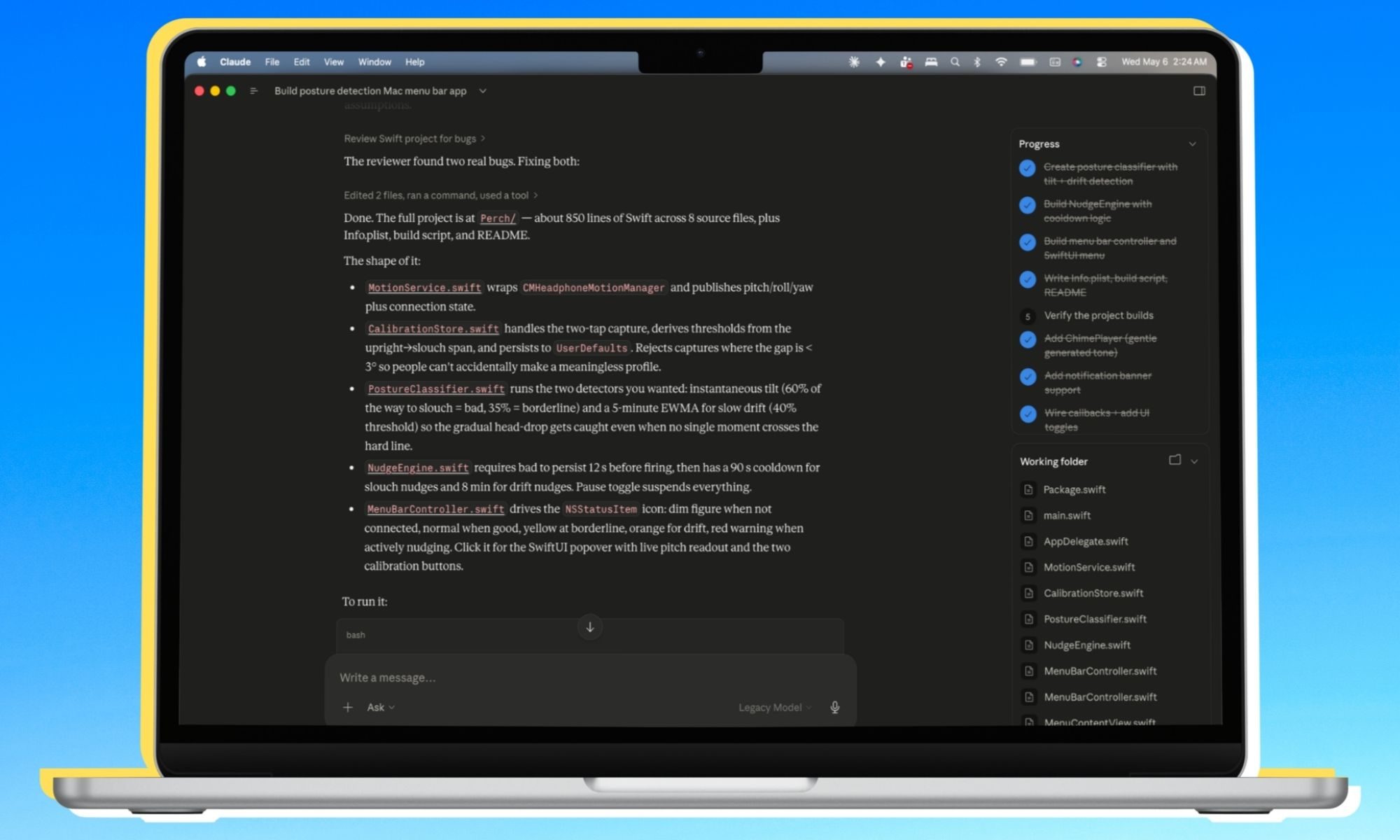
Claude even created a menu bar icon, the posture notification banner (and the warning language), the menu bar UI box when I interact with the app, and even the calibration controls. The AI handled colour-changing animations, set the rules for detecting bad posture duration, added an alert chime to the whole flow, and created a two-stage warning system.
It all started with “I want to build this app” in a chatbox, and what followed was a full conversation app development experience. I didn’t even instruct it on a majority of the app’s visuals and the internal protocols. I saw the whole concept of front-end and backend coalesce and disappear in the background. The only layer that remained was natural language.
Claude asked if the app should have XYZ features, and I just YES-d my way through it all.
To say that I was shocked would be an understatement. Claude even created a fitting app icon and saved it all neatly in a folder. Once the code was compiled, the whole process of launching and running the app felt just like any other app installed from the internet. Except, in this case, the app was created and stored solely on my Mac, and no activity data ever leaves my device.
How does the app work?
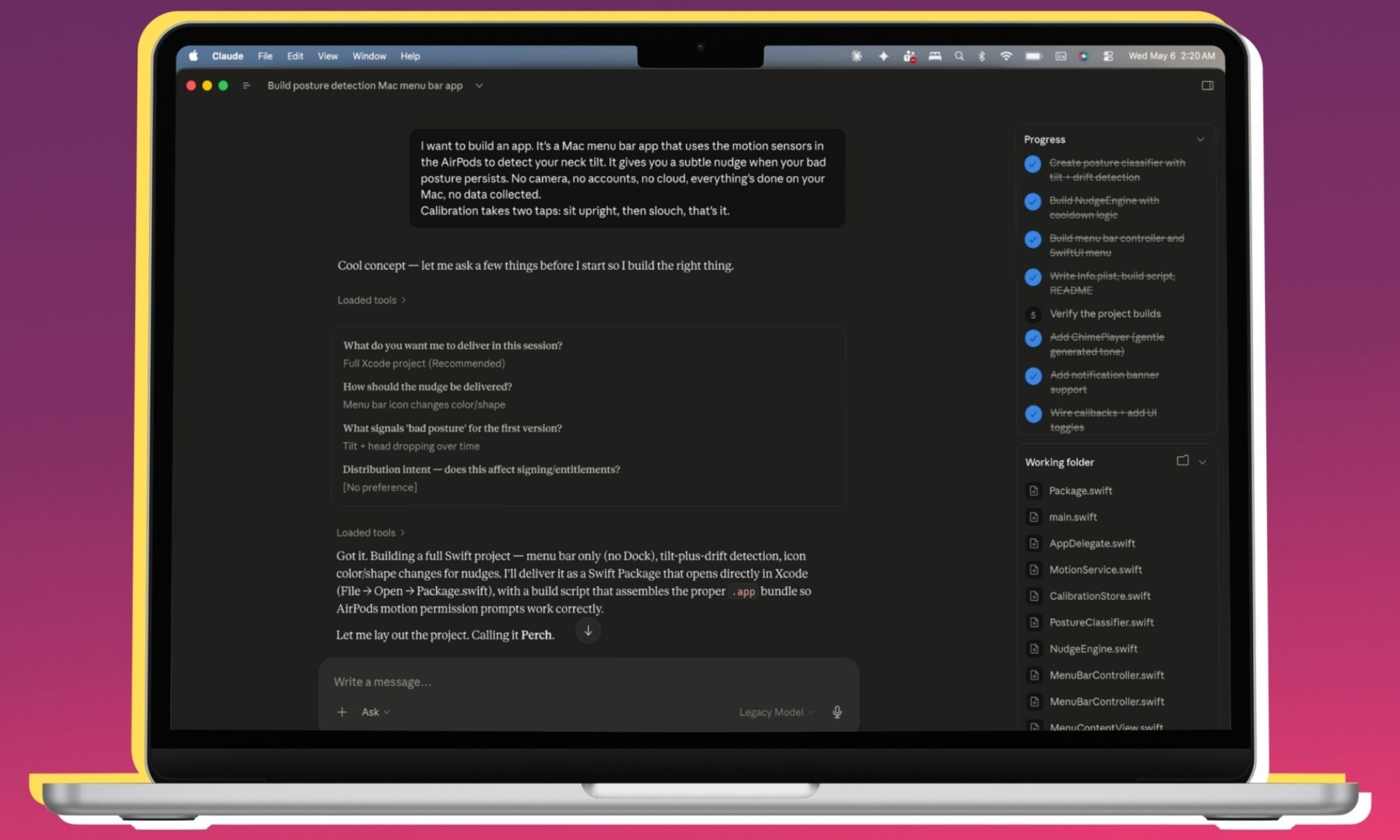
The core idea, as described above, is to use the AirPods’ motion sensors to detect changes in your posture and shoot a warning message. When I launch the app, it asks me to sit upright (or the naturally healthy posture) and sets it as the ideal posture based on the angular data logged by the AirPods’ motion sensors. Next, it asks you to sit in a bad posture, the slouched or face-forward hunching posture, and records the spatial data for it.
That’s all.
You wear the AirPods, launch the app, calibrate the good and bad posture, and you’re good to go. I don’t have to manually input any height or angular data. I just sit in the right and wrong postures, let the app record each, and I’m good to go. I don’t even see the app running in the dock. Instead, Claude created it solely as a Menu bar utility, where I can always see it, without having to worry about screen clutter or running a Command+Tab shortcut for checking the activity.
When I am sitting straight, the app’s icon is grey. As soon as it detects a change in posture, the icon turns yellow. If the posture worsens, the icon turns red with motion indicators. If the unhealthy sitting posture is sustained for over 12 seconds, the app’s icon turns into a fiery red triangle, and a notification banner pops up in the top-right corner of the screen, telling me to fix my posture.
This notification is just like any other, sent by the apps installed on your Mac. It respects the focus mode behaviour, and I can choose to act on or dismiss it with a single click. I was initially skeptical about the whole premise, but the app did a fantastic job with motion sensing and detecting posture change. I had my siblings and four friends try the app using my second-gen AirPods Pro. They were pleasantly surprised by how responsive it was, praising the genuinely helpful premise of such a utility.
What next?
Now, I am not inclined to push it on the App Store. It’s just too much work. Doing so would require getting an Apple developer account, going through Apple’s notorious quality check process, and almost certainly hiring someone to manage it in the long run. That was never the objective in the first place. I just wanted to check if it’s possible to build a personal app using an AI, and I found the answer.
It’s possible.
The whole process is so simple that I didn’t even have to worry about which Claude model is best for the job. There are multiple specialized Claude models, by the way. I simply described the app’s premise, and the Mac app automatically picked the right model and kicked into action.
Maybe I was lucky, because Claude is famously good with coding-related chores. My previous experiments with vibe-coding ended up in a mess where I simply ran into walls with no technical know-how of how to proceed further.
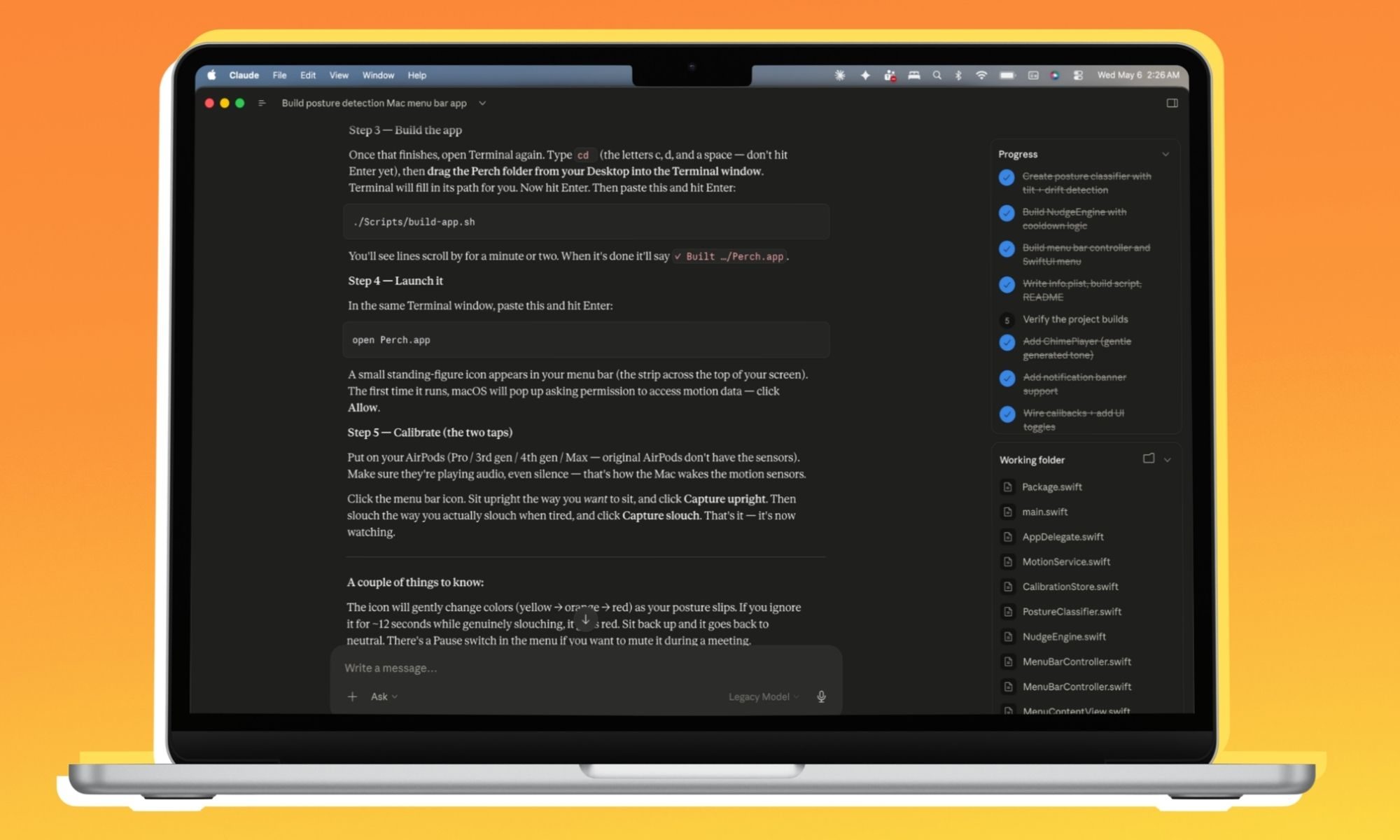
As far as running the app goes, Claude gave step-by-step instructions on what to do with the folder it had created, how to launch the terminal, and the exact command I had to type (again, I copied it from the Claude chat box), and build a fully functioning app. To my utmost surprise, the code ran without a single error, and in the first attempt. And so far, the app has worked reliably, without any abrupt crashes or stutters. It even maintained the consistency after I requested a few functional changes.
Alright, what about the privacy?
A recurring concern that I often hear from users is the privacy aspect of fitness and health software, especially when wearables are involved. Do you really want an independent developer’s app to get access to a horde of your health data, from your heart data to your sleep patterns? I am not easy with giving that data to Google, Apple, or Samsung. There’s plenty of past precedent for leaky health apps.
Blindly trusting an app without poring over its data sharing and privacy policies is like letting a stranger get access to your medical records and leaving them with full control over how they want to sell that data to anyone they want. That’s basically how activity tracking on the internet works, creating an ecosystem where you see hyper-personalised ads on your phone and PC.
So, what’s the solution? On-device processing. Or in simple terms, create a system where no data ever leaves your device. None of your health logs are saved on a cloud server. Everything is recorded, processed, and the results are shown — on the device in your pocket, lap, and wrist. Or in this case, something that sits in your ears for hours each day.
Going a step further — and something that directly ties into the theme of the app that I created — is to keep the software restricted to yourself. Build an app for yourself, something that never leaves your own devices. Think of it as creating a shortcut on your iPhone, or an automation routine that only works for the smart home devices in your home.
This way, I don’t have to share my data with anyone. No third party is involved in gathering or tracking any information. I am simply pushing the AirPods’ sensors and using the data collected by them to produce actionable results. All I need is a Bluetooth connection, and the whole sensing-to-warning operation runs solely on my MacBook.
Why is this a game-changer?

I have never written a single line of code in my entire life. Not because I never got the opportunity. I just found the process too intimidating. The sight of random color-coded lines, terms like syntax, loop, repositories, and logic, killed any enthusiasm that I had about becoming a “builder” someday.
When AI coding tools first landed on the scene, with sky-high hype of turning every non-coder into a builder, I was psyched. There was finally some tangible hope for me. ChatGPT Codex, Lovable, Vercel, and Replit chatter flooded my X timeline. Some of them are now even promising a “prompt-to-publish” pipeline, straight from your phone.
The reality is quite different.
Even if you have a killer idea for a million-dollar app and manage to prompt your way through from start to end, actually turning the code into a running app is a daunting task. And if you dream about publishing it on the App Store or Google Play Store, you need to go through a vexingly complicated process with registering developer accounts and going through the platform guidelines.
On top of it, if you’re trying to tie your app into information or intelligence pulled from another platform — let’s say Google Search or social media — you have to go through the process of figuring out APIs, pondering over the payment processing pipeline, and more. As a no-coder, how do you plan to ship fixes and new features with updates? Yeah, that too.

You see, having a cool idea for an app is just scratching the surface. But if you hope to build a business atop it, or just want to share the fruit of your mental labour with the world, you need someone with deep knowledge of the whole app development and publishing pipeline. The dreams of a one-man business built atop vibe-coding foundations are only for someone who already has some prior experience.
I fall far beyond that class of dreamers.
Most of us simply want utilities that work for us. So far, if something didn’t exist, we had to wait for a developer to eventually build it. Or live with an existing app that gets the job done, with its own set of missing tricks and frustrations. Tools like Claude put the power in the hands of an average Mac user like you or me. For now, I can’t stop thinking about all the ideas I can now turn into apps by simply talking to Claude and willing it into existence on my Mac. It’s just wonderful.