Android version 10
Google released Android 10 — the first Android version to shed its letter and be known simply by a number, with no dessert-themed moniker attached — in September of 2019. Most noticeably, the software brought about a totally reimagined interface for Android gestures, this time doing away with the tappable Back button altogether and relying on a completely swipe-driven approach to system navigation.
Android 10 packed plenty of other quietly important improvements, including an updated permissions system with more granular control over location data along with a new system-wide dark theme, a new distraction-limiting Focus Mode, and a new on-demand live captioning system for any actively playing media.

Android 10’s new privacy permissions model adds some much-needed nuance into the realm of location data.
JR Raphael / IDG
Android version 11
Android 11, launched at the start of September 2020, was a pretty substantial Android update both under the hood and on the surface. The version’s most significant changes revolve around privacy: The update built upon the expanded permissions system introduced in Android 10 and added in the option to grant apps location, camera, and microphone permissions only on a limited, single-use basis.
Android 11 also made it more difficult for apps to request the ability to detect your location in the background, and it introduced a feature that automatically revokes permissions from any apps you haven’t opened lately. On the interface level, Android 11 included a refined approach to conversation-related notifications along with a new streamlined media player, a new Notification History section, a native screen-recording feature, and a system-level menu of connected-device controls.

Android 11’s new media player appears as part of the system Quick Settings panel, while the new connected-device control screen comes up whenever you press and hold your phone’s physical power button.
JR Raphael / IDG
Android version 12
Google officially launched the final version of Android 12 in October 2021, alongside the launch of its Pixel 6 and Pixel 6 Pro phones.
In a twist from the previous several Android versions, the most significant progressions with Android 12 were mostly on the surface. Android 12 featured the biggest reimagining of Android’s interface since 2014’s Android 5.0 (Lollipop) version, with an updated design standard known as Material You — which revolves around the idea of you customizing the appearance of your device with dynamically generated themes based on your current wallpaper colors. Those themes automatically change anytime your wallpaper changes, and they extend throughout the entire operating system interface and even into the interfaces of apps that support the standard.

Android 12 ushered in a whole new look and feel for the operating system, with an emphasis on simple color customization.
Surface-level elements aside, Android 12 brought a (long overdue) renewed focus to Android’s widget system along with a host of important foundational enhancements in the areas of performance, security, and privacy. The update provided more powerful and accessible controls over how different apps are using your data and how much information you allow apps to access, for instance, and it included a new isolated section of the operating system that allows AI features to operate entirely on a device, without any potential for network access or data exposure.
Android version 13
Android 13, launched in August 2022, was simultaneously one of the most ambitious updates in Android history and one of the most subtle version changes to date.
On tablets and foldable phones, Android 13 introduced a slew of significant interface updates and additions aimed at improving the large-screen Android experience — including an enhanced split-screen mode for multitasking and a ChromeOS-like taskbar for easy app access from anywhere.

On regular phones, Android 13 brought about far less noticeable changes — mostly just some enhancements to the system clipboard interface, a new native QR code scanning function within the Android Quick Settings area, and a smattering of under-the-hood improvements.
Android version 14
Following a full eight months of out-in-the-open refinement, Google’s 14th Android version landed at the start of October 2023, in the midst of the company’s Pixel 8 and Pixel 8 Pro launch event.
Like the version before it, Android 14 didn’t look like much on the surface. That’s in part because of the trend of Google moving more and more toward a development cycle that revolves around smaller ongoing updates to individual system-level elements year-round — something that’s actually a significant advantage for Android users, even if it does have an awkward effect on people’s perception of progress.
But despite the subtle nature of its first impression, Android 14 delivered a fair amount of noteworthy new goodies. The software introduced a new system for dragging and dropping text between apps, for instance, as well as a number of new improvements to privacy and security — including a new settings-integrated dashboard for managing health and fitness data and a more info-rich and context-requiring system for seeing exactly why apps want access to your location. And it brought about a new set of native customization options for the Android lock screen.

Android 14 includes options for completely changing the appearance of the lock screen as well as for customizing which shortcuts show up on it.
JR Raphael / IDG
Android version 15
Though Android 15 followed the trend of significant advancements arriving as their own separate rollouts — outside of and even ahead of its arrival, as an official operating system update — 2024’s new Android version was certainly no slouch.
The software introduced a number of noteworthy new features — including a redesigned system volume panel, an option to automatically re-enable a device’s Bluetooth radio a day after it’s been disabled, and a Pixel-specific Adaptive Vibration feature that intelligently adjusts a phone’s vibration intensity based on the environment. It also marked the debut of a system-level Private Space area that lets you keep sensitive apps out of sight and accessible only with authentication.
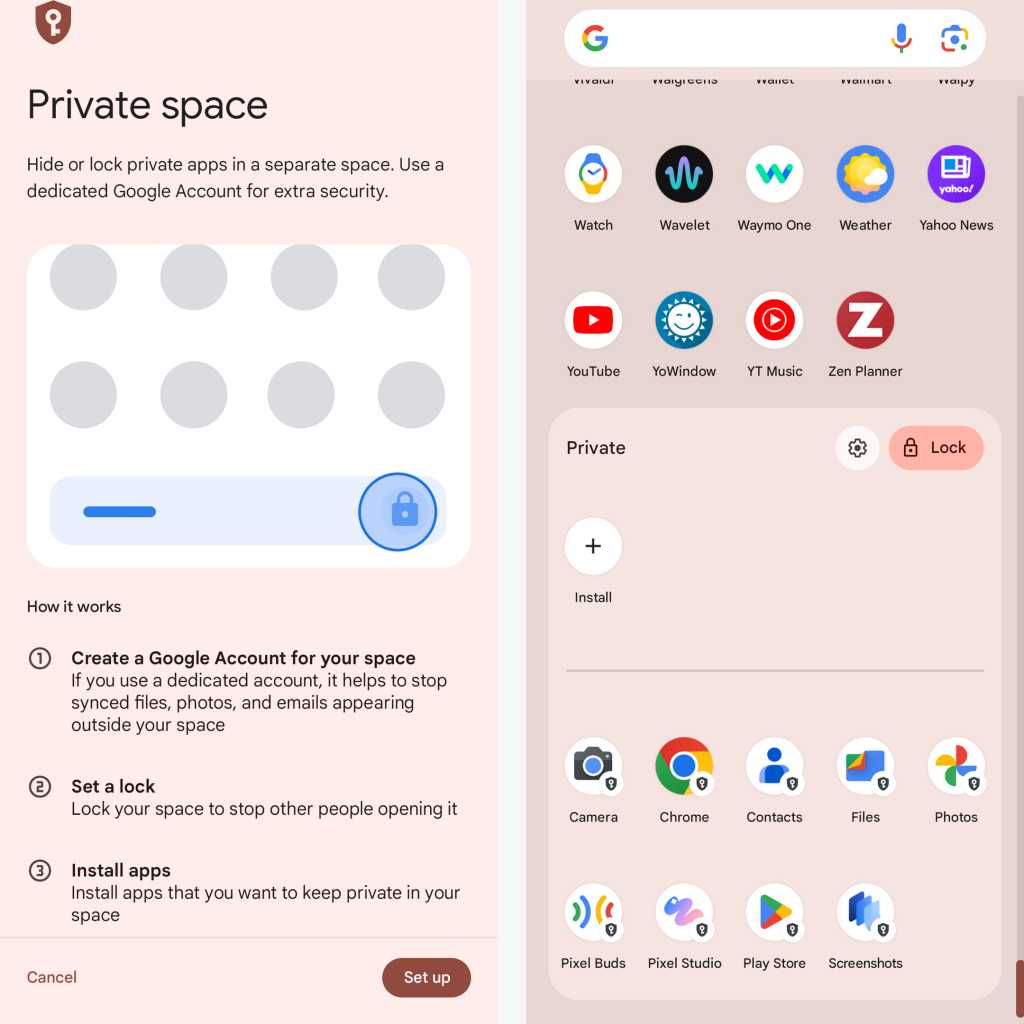
Once you set up Android 15’s new Private Space feature, certain apps appear in a special protected — and optionally hidden — area of your app drawer.
JR Raphael / IDG
Add in handy touches like a space-saving app archiving option and a predictive back visual that lets you sneak a peek at where you’re headed before you get there, and this small-seeming update shaped up to be a pretty hefty progression.
Android version 16
In a marked change from recent Android upgrade cycles, Google decided to go with two new Android versions per year as of 2025 — starting with Android 16 in the spring and then following that with a smaller release in the fall.
True to that promise, Android 16 catapulted into the world in early June, creating the framework for future-facing systems such as Live Updates — a new type of notification designed to support persistent, ongoing alerts, similar to what Apple does with iOS’s Live Activities — and introducing an Advanced Protection security supermode that provides a simple single-switch way to activate a whole slew of advisable Android security settings in one fell swoop.

The Android 16 Advanced Security control panel, as seen on a Google Pixel phone.
JR Raphael, Foundry
The update included a sprawling series of other new security strengtheners, too, making protection seem like the true centerpiece of Android 16 — even if other touches, such as a more advanced standard for hearing aid support, helped flesh out the software into a rounded and feature-rich release.
Android version 17
With its relatively low-key arrival in June 2026, Android 17 officially brings the long under-development Bubbles multitasking system to the Android-owning masses — adding an interesting new way to keep any app available on demand in a floating, collapsible window for easy ongoing access.
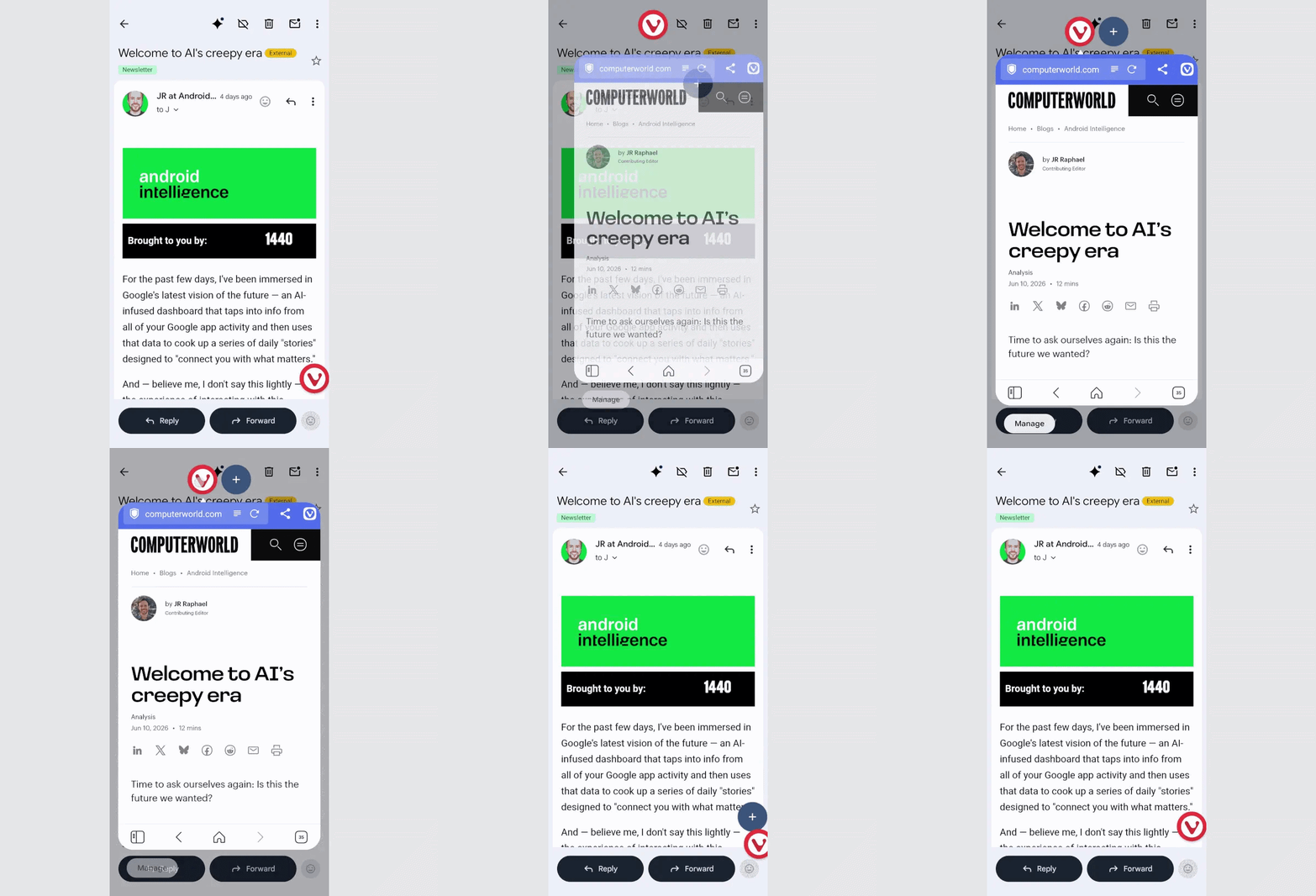
Android 17’s Bubbles offers a whole new way to think about multitasking.
JR Raphael, Foundry
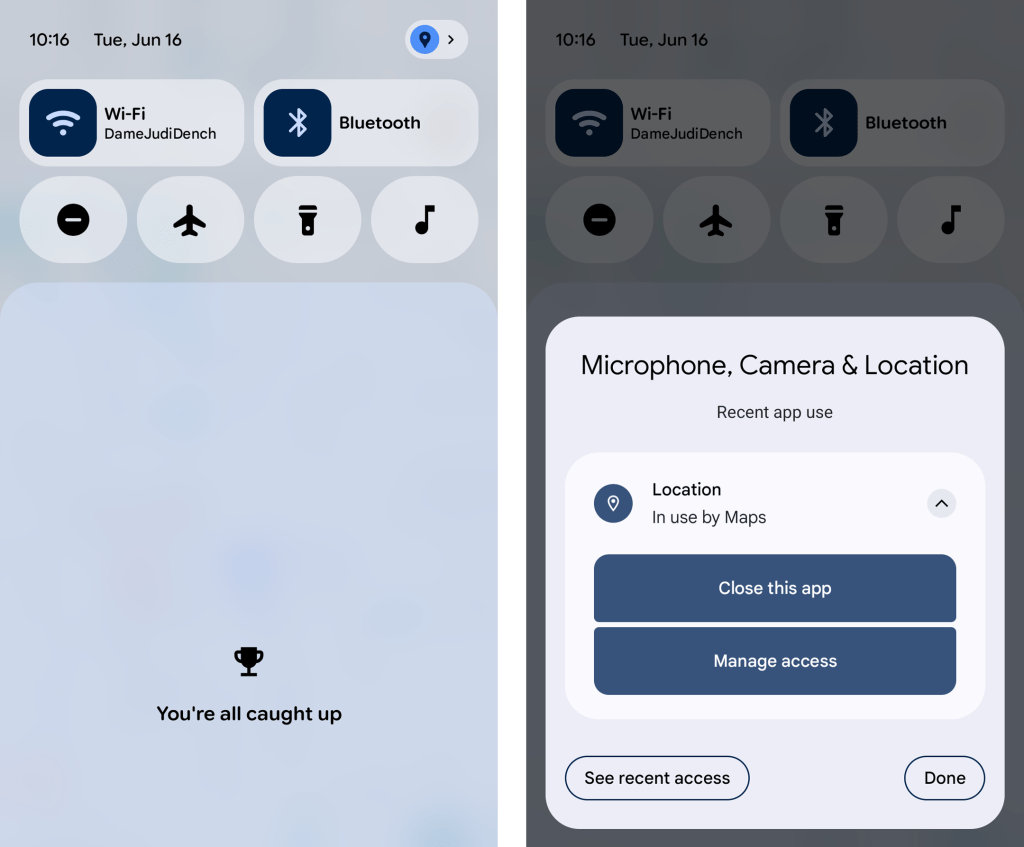
Speaking of bubbliness, Android 17 also includes the creator-aimed option of showing a cutout of your face from a front-facing camera over an active screen recording — because why not, right? — along with such practical touches as a more dynamic and consistent system-wide dark mode and a more nuanced and effective way to track and control app location access.
JR Raphael, Foundry
While those features and the inevitable slew of under-the-hood security, performance, and privacy improvements add up to form a compelling final picture, it’s hard not to notice that much of Google’s focus in this era is now on the AI layers surrounding Android as opposed to being on Android itself, as an operating system. The company’s I/O conference in May showcased many such measures, appropriately noting that Android was transitioning from being “an operating system” into being “an intelligence system” (whatever that means).
Most of those “intelligence system” items remain limited in ability or not yet available as of the time of Android 17’s release — like the new and improved speech-to-text system for Gboard, the custom-widget-creating system for Android phones, and the multistep automation system for allowing AI to complete complex tasks on your behalf (assuming that you (a) trust such a system to act on your behalf and (b) don’t find the level of access and resulting manner of assumptions it makes about your life to be overly creepy).
But even at its foundational level and without any AI-laden Halo effect included, Android 17 manages to hold its own — with Bubbles acting as an anchor and bringing some much-appreciated new productivity potential our way.
This article was originally published in November 2017 and most recently updated in June 2026.