
At a Glance
Expert’s Rating
Pros
- Excellent speeds and streaming performance
- Intuitive, well-designed apps
- Strong security and independently audited privacy practices
- Broad device support and growing privacy feature suite
Cons
- More expensive than some competitors, especially upon renewal
- No multi-hop connections
Our Verdict
ExpressVPN continues to impress with excellent speeds, easy-to-use apps, reliable streaming, and some of the strongest privacy practices around. It’s still a little pricey and lacks a few advanced features, but its expanding suite of security tools makes it easier than ever to justify the cost.
Price When Reviewed
This value will show the geolocated pricing text for product undefined
Best Pricing Today
Price When Reviewed
Plans from $2.99 a month for 2 years + 4 free months
Best Prices Today:
ExpressVPN (Monthly)
$2.99
ExpressVPN in brief:
- P2P allowed: Yes
- Simultaneous device connections: 10 for Basic, 12 for Advanced, and 14 for Pro plans
- Business location: British Virgin Islands
- Number of servers: 3,000+
- Number of country locations: 113
- Cost: $14.99 per month, $74.85 for a 1-year, or $83.72 for a 2-year Basic plan
When you think of VPNs, ExpressVPN is likely one of the first names that pops into your head. That’s no surprise as the company has grown into a household name over recent years and become synonymous with online privacy.
It is, and has been, one of the most trustworthy and notable VPN providers on the market from the very beginning. And with each successive year the service just keeps improving. Since our last review, ExpressVPN has undertaken two more independent security audits, launched post-quantum encryption for all apps, and added its own suite of identity-theft protection tools. It has become a one-stop privacy and security powerhouse.
Further reading: See our roundup of the best VPNs to learn about competing products.
What are ExpressVPN’s features and services?
ExpressVPN has been busy recently. The biggest changes come to its desktop apps, which have undergone major redesigns across Windows, Mac, and Linux. The new apps are easier to navigate, come with interactive server maps, and more customization options. ExpressVPN also launched a new hybrid browser extension that can work independently of the desktop app, giving users more flexibility over how they connect.
It has also expanded its suite of privacy tools, introducing ExpressMailGuard, an email relay service that lets you create aliases to hide your real email address, and ExpressAI, a private AI chatbot included with its top-tier subscription. The company has also upgraded its Identity Defender service with a dedicated mobile app for identity monitoring, automated data removal, and identity-theft protection.
In total, these new features mark a substantial expansion for the service, although some are restricted to higher subscription tiers and Identity Defender is currently only available in the U.S.
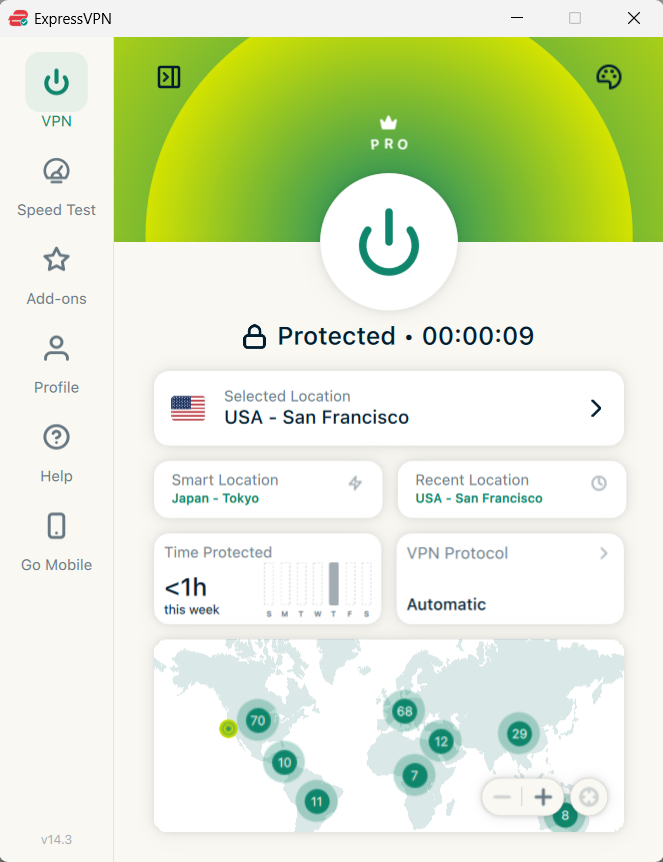
ExpressVPN’s newly revamped Windows app adds functionality without disrupting the easy-to-navigate interface.
Sam Singleton
As I mentioned, ExpressVPN’s Windows app has received a complete makeover since our last review. Gone is the old single-panel interface, replaced by a more modern layout with easier navigation and a handful of useful new features. You can now browse server locations through an interactive map which seems to be the default for VPNs nowadays. It also allows you to save your favorite connections, and switch between different visual themes, including dark mode.
The basic functionality remains pretty much the same though. You still have easy access to connecting and disconnecting from the VPN, but the new layout puts more of its advanced features and settings within reach. While I don’t know if anyone was clamoring for a UI update, it’s a positive upgrade to an app that was already one of the more user-friendly VPN clients around.
ExpressVPN offers a nice-sized server network that spans 113 countries across 214 locations, with 3,000+ servers to choose from. This is an increase from the 105 countries available during our last review and includes new locations in places such as Qatar, Nigeria, and Greenland. Admittedly, other VPNs offer more countries, but in all of the time I’ve used and tested ExpressVPN I never really found this to be an issue. The service also continues to offer servers in all 50 U.S. states, which is a nice bonus for anyone looking for a connection in a specific region.
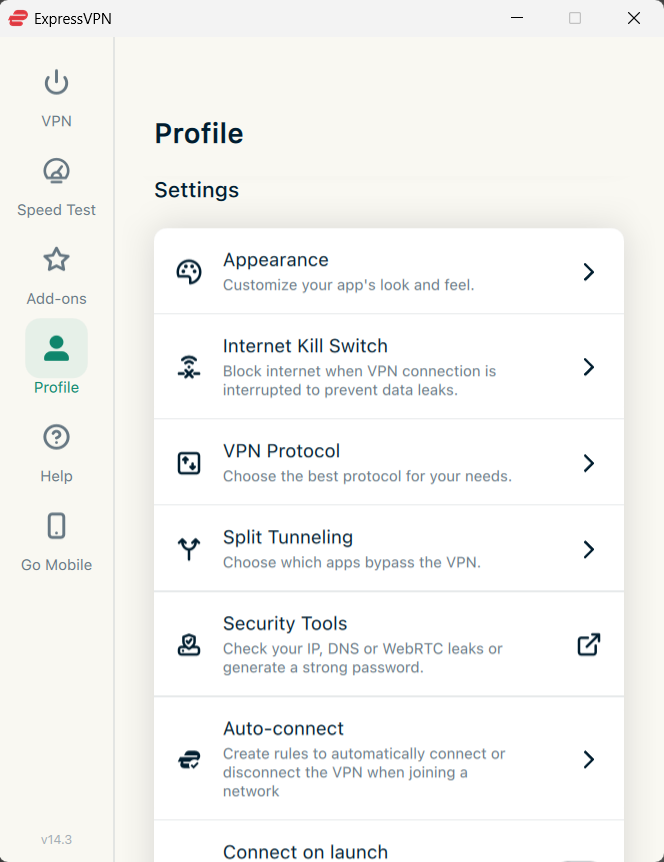
ExpressVPN’s settings offer almost everything you could need for your VPN connection, except multihop.
Sam Singleton
ExpressVPN also offers a decent variety of customizable features for those who want more control over their connections. You’ll find the usual kill switch, split tunneling, and protocol options, but the new Windows app adds a few more advanced capabilities. Split tunneling now works with specific IP addresses and subnets, allowing for more precise traffic routing. You can also set rules to automatically connect or disconnect the VPN depending on which network you’re using. It’s nice to see ExpressVPN adding some more advanced features without making the whole experience overly complicated.
Notably, however, ExpressVPN still does not offer a multi-hop feature to allow you to further obfuscate your connection by chaining it through multiple VPN servers rather than just one. This is unfortunate as many competitors already offer multi-hop connections and it’s a useful privacy enhancing feature for users. For a service as robust as ExpressVPN to not have multi-hop is disappointing—it feels like someone didn’t get the memo.
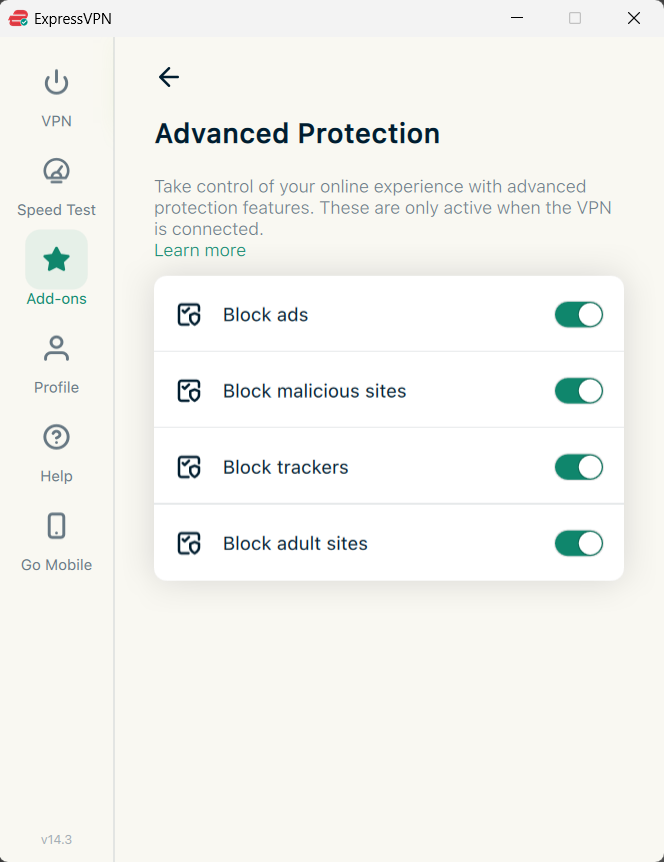
ExpressVPN offers the option to block ads, malicious sites, trackers, and adult sites if you so choose.
Sam Singleton
ExpressVPN also includes its own suite of security tools under Add-ons > Advanced Protections. These allow you to block ads, trackers, malicious websites, and adult content directly through the VPN app. The exact features depend on your subscription tier, with Advanced and Pro offering more comprehensive blocking options than Basic. It’s certainly nice to have and you won’t find me arguing against it, but at this point there are likely better stand-alone security suites that offer better blocking and protection.
It’s also worth mentioning that while I focused on the Windows app for the purposes of this review, ExpressVPN does offer incredibly broad device and browser support. Besides Windows, it’s available for MacOS, iOS, Android, Linux, ChromeOS, Fire Stick, Android TV, Apple TV, and compatible routers.
Mac users in particular have received some welcome upgrades, including the return of split tunneling on macOS 11 and newer with the version downloaded directly from ExpressVPN’s website. Linux users also now have a full graphical interface instead of having to rely solely on the command line.
ExpressVPN has also revamped its browser extensions for Chrome and Firefox. Previously, they acted mainly as remote controls for the desktop VPN app—which is still possible, but the new hybrid extension can now function independently to protect just your browser traffic. It also includes Smart Routing, allowing you to set different connection rules for specific websites.
How much does ExpressVPN cost?
ExpressVPN recently revamped its pricing model and now offers three membership tiers: Basic, Advanced, and Pro. Each is available in a monthly plan, a 1-year plan, or a 2-year plan.
Basic is the cheapest tier and comes with the VPN for up to 10 simultaneous devices, ad and malicious-site blocking, and limited access to ExpressMailGuard. The latter includes 10 shared email aliases and 10MB of monthly email relay traffic. The Basic monthly subscription costs $14.99 per month, $74.85 for 1-year, or $83.72 for a 2-year plan. If you opt for the 2-year plan you’ll also receive an additional four extra months for free. After your initial subscription term ends, both the 1-year and 2-year Basic plans will renew at $99.95 per year.
Advanced provides everything from Basic plus 12 simultaneous connections, full ad- and tracker-blocking, and ExpressKeys password manager. It also increases ExpressMailGuard’s limits and includes 3GB of eSIM data valid for three days. U.S. subscribers also get access to the newly revamped Identity Defender app. An Advanced subscription costs $16.99 per month, $89.85 for 1-year, or $125.72 for a 2-year plan. Again, you’ll get an extra four months free if you subscribe to the 2-year plan. Annual fees renew at $119.95 after their initial term.
Express Pro is the top-tier membership and comes with everything from Advanced plus 14 simultaneous connections, five days of eSIM service, and a dedicated IP address. It also includes unlimited ExpressMailGuard email relaying, expanded Identity Defender coverage for U.S. subscribers, and ExpressAI. A Pro subscription costs $22.99 per month, $134.85 for 1-year, or $209.72 for a 2-year plan plus four extra free months. The Pro annual fees renew at $199.95 per year after the initial term.
The monthly price for the Basic plan is still rather high, especially considering the limited extras. Advanced offers much better value with its expanded security tools, password manager, and identity protection features for U.S. users. Of course, all subscriptions become much more reasonable when opting for longer-term plans. The Advanced plan in particular is a great deal for most users if they can swing the upfront cost. The Pro plan is also an excellent value if you want your own dedicated IP—something that is rarely offered packaged together and usually costs as much or more per month as the entire Pro plan.
ExpressVPN offers a 7-day free trial for new members as well as a 30-day money-back guarantee on all subscription plans if you decide that it isn’t for you.
Subscriptions can be paid for via credit card, PayPal, or BitCoin.
As far as user privacy is concerned, there aren’t many better VPNs out there than ExpressVPN.
How is ExpressVPN’s performance?
When testing how fast a VPN is, I rate the service’s speeds across servers in six different countries all around the world over the course of a few days and then compare them to my baseline internet speed during that time.
In my testing, ExpressVPN server speeds were once again excellent. Across all locations tested, the average download speed was 70 percent compared to the base speed and the average upload speed was an equally impressive 80 percent compared to the base. That firmly puts it into our top five fastest VPNs, up there as one of the speed kings—the McLaren to NordVPN’s Ferrari, if you will.
The speeds this time around did drop about 1 percent from last year’s tests, but that shouldn’t be cause for concern as internet speeds are notoriously fickle. It’s still a lot faster than most services we’ve evaluated and is more than sufficient to accommodate a home user’s online activities. You aren’t likely to notice much, if any, buffering issues while streaming or lag while gaming.
ExpressVPN’s latest Lightway Turbo protocol promises increased speeds and it mostly delivered, kind of. While I did notice some servers sped up quite a bit (around 10 to 15 percent), average speeds across all servers tested with the new protocol were about the same as overall averages. Lightway Turbo averaged 72 percent of the base download speeds and upload speeds were still hovering at 80 percent. Some servers were faster, but oddly, other servers were a bit slower than with alternative protocols.
That being said, I use Lightway Turbo as my default protocol on Windows nowadays with ExpressVPN. The connections are stable and once I figured out which servers worked best in my own situation then it did actually provide a performance boost. Other users may have mixed results, but I still think it’s a worthy upgrade overall.
ExpressVPN has long promised that it will unblock Netflix and that still holds true. In fact, it not only unblocked Netflix, but also any other major streaming service that I tested including Amazon Prime, HBO Max, Hulu, Disney Plus, and AppleTV.
ExpressVPN is also a great option for torrenting, with P2P file sharing supported across its entire server network. And with its excellent speeds and strong privacy protections, large torrent files shouldn’t be an issue. The only downside is the lack of port forwarding, which may be a drawback for users who regularly seed torrents.
How is ExpressVPN’s security and privacy?
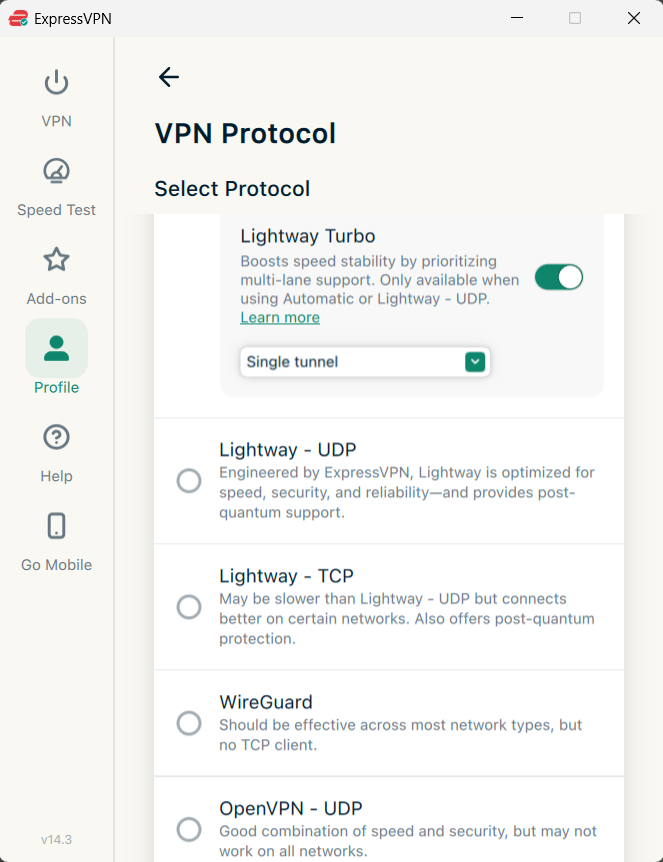
ExpressVPN allows you to change your protocol between its proprietary Lightway, post-quantum WireGuard, and OpenVPN.
Sam Singleton
ExpressVPN offers OpenVPN and its aforementioned proprietary Lightway protocols, as well as its newly integrated post-quantum WireGuard protocol. It uses its Lightway Turbo protocol to connect by default—this can be changed under the Options menu if you wish.
The Lightway protocol is open source and you can find it on GitHub. It’s also undergone a security audit by the penetration testing firm Cure53. For those who don’t want to use Lightway, there is the option in the Windows app to change it to the aforementioned OpenVPN—now upgraded with DCO for better performance—or WireGuard instead. IKEv2 and L2TP/IPSec protocols may be available as well depending on your operating system.
Another nifty privacy feature that ExpressVPN offers is ShuffleIP. This feature, active by default, automatically changes your IP address for each website you visit rather than remaining static like many other VPNs. This privacy-enhancing feature makes it much more difficult for potential third parties to track your online activity.
As far as user privacy is concerned, there aren’t many better VPNs out there than ExpressVPN. It claims not to log any of your browsing history, or other personal data such as DNS queries, IP addresses, connection timestamps, or session duration. It does keep diagnostic and crash reports, but one thing that I really like is that ExpressVPN’s app on Windows asks you up front if you want to contribute this data. More of these options in the future, please.
The service is remarkably upfront about what it does and doesn’t track, and it backs up its claims with numerous independent audits. In 2025, KPMG once again assessed ExpressVPN’s no-logs policy and TrustedServer technology, confirming that its systems were designed to uphold the company’s privacy commitments.
ExpressVPN has continued this commitment to independent testing throughout 2026, reaching 28 published third-party security audits as of July. Recent assessments by security firm Cure53 even examined ExpressKeys, ExpressAI, ExpressMailGuard, and Identity Defender. While these latest audits focus on the company’s broader privacy tools rather than its core VPN, they’re still a welcome sign of transparency. Few VPN providers have gone to such lengths to have their technology independently scrutinized.
Surely, the sheer number of independent audits makes ExpressVPN one of the most extensively audited VPN providers on the market. It’s a level of transparency that can only be applauded.
Furthermore, ExpressVPN is located in the British Virgin Islands which is not subject to any international signals intelligence-sharing alliances or data retention requirements. Meaning it’s much more difficult for any government to force ExpressVPN to share any data about users or servers. Turkey even forcefully seized ExpressVPN servers in 2017 and still came up with nothing anyways—I call that the ultimate independent audit.
Is ExpressVPN worth it?
The short answer is: absolutely. In fact I don’t think that there are many VPN services out on the market today that rival ExpressVPN. Its combination of excellent speeds, ability to unblock every streaming service, and dedication to user privacy hits all of the right notes. Add to that an interface that is dead-simple to use and broad device support and you get a VPN that ticks just about every box. I still wish it offered multi-hop connections and a few more advanced customization options, but these are relatively minor complaints.
ExpressVPN isn’t the cheapest option available, but its expanded feature set makes the higher price easier to justify. The redesigned apps, larger server network, and growing lineup of privacy and security tools only add to an already excellent VPN. Practically everything about ExpressVPN is top-tier, and it remains one of the best VPNs around.
Editor’s note: Because online services are often iterative, gaining new features and performance improvements over time, this review is subject to change in order to accurately reflect the current state of the service. Any changes to text or our final review verdict will be noted at the top of this article.