Some PhoneArena readers might recall my theory (obviously a very preposterous one) that Google forces some of its app designers and engineers to sit in a room locked from the outside until they come up with some changes to a first-party app. Over the years we have seen so many changes to apps like Google Maps and Google Messages as Google continually seeks to improve the user experience to make its apps faster and easier to use.
Google continues to improve the Google Messages app
Today, we have another change to Google Messages to tell you about. Google is now rolling out a new look for the “Message Details” feature to the stable version of the Google Messages app running version 20250725_02_RC00 or later. The new format shows a copy of the text on top from the message that was sent. Under a heading called “Status,” it will show the date and time that the message was read, delivered, and sent. Under the “From” heading, it will show your profile icon and note that “You” were the one who sent it.
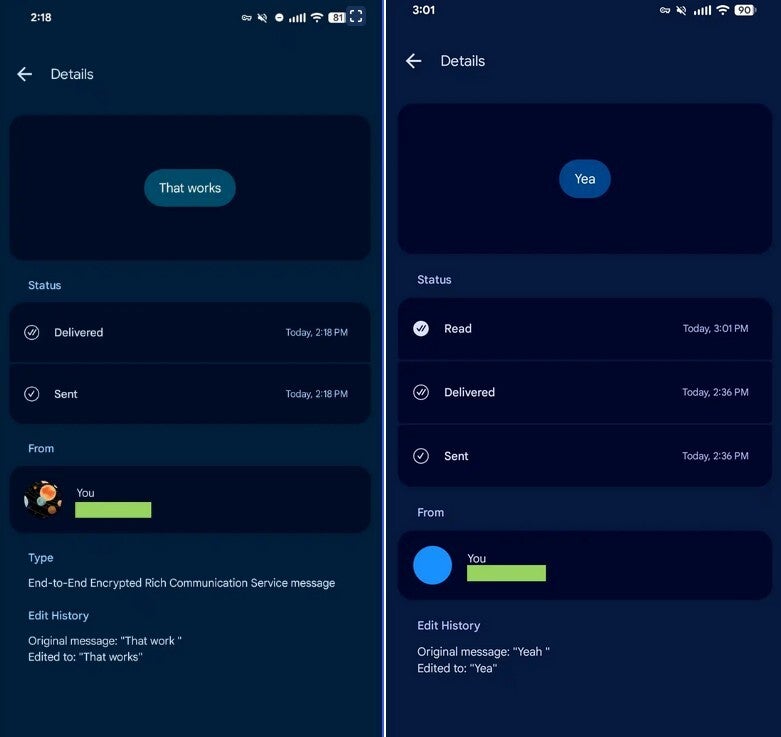
The new Details page for the Google Messages app. | Image by 9to5Google
The Details page now shows edits made to messages, at least for Beta testers right now
The information also includes an Edit History, which is actually very useful information to have. You will be shown what the original message said followed on the next line with the edited message. So if you wrote, “I eight a full meal,” realized your mistake and corrected it, the line underneath would say “Edited to: ‘I ate a full meal.'” Here’s the thing. Beta testers are seeing an additional bit of information under the “Type” heading. This info reveals if your message was sent RCS (Rich Communication Services) via end-to-end encryption.
To see the “Message Details,” open the Play Store app and long-press the message that you want to see the additional information on. Tap the three-dot icon and “Details.”