7. Just like Assistant before it, Gemini is great at helping you check in on your calendar. Ask it What’s on my agenda for today, When’s my first meeting tomorrow, or When’s my next haircut — or any other variations on those same concepts you can come up with — for a quick ‘n’ easy way to see what you’ve got ahead.
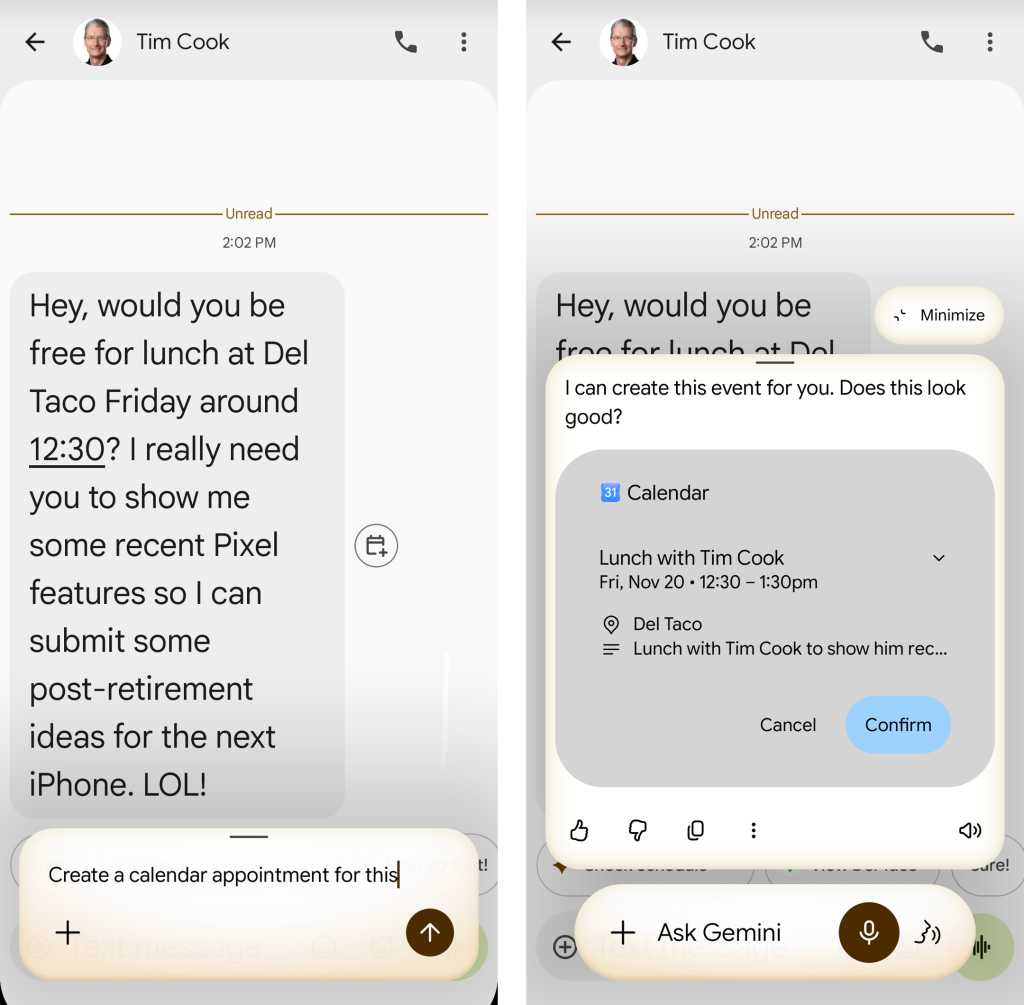
8. You don’t have to stop with calendar check-ins: Gemini can also make new appointments for you in some especially useful ways. In addition to simply asking it to Create a new calendar appointment for [whatever] on [whatever day and time], you can summon Gemini anytime you’ve got info about an event on your screen — in an email, on a website, within a text or Slack thread, or whatever — then say Create a calendar appointment for this. Gemini will interpret the visible info and format it into a full event on your calendar in a single swift step.
JR Raphael, Foundry
Part III: Intelligent interactions with Gemini on Android
9. When you find yourself palming a physical business card, skip the third-party importing apps and manual entry effort and instead let Gemini scan the card and create a new contact for you. Just tap the plus icon within Gemini’s prompt, select “Camera,” and snap a fast photo of the card — then tell Gemini to save it as a contact. The same concept will also work when you see someone’s contact info on your screen in an email, a web page, a document, or anywhere else imaginable.